ABOUT THE GAME
Combat
Follow the lights. Find the missing.
Fights happen in real time in a shared world. Your hero strikes on its own; you choose whom to fight, where to stand, which abilities to use and when to defend.
Basics
The heartbeat
Basic attacks follow a shared 2-second heartbeat. On each beat your hero strikes the selected enemy if it is in sight and within your weapon’s reach. You don’t press anything to swing: keep your target, stay in range, and spend your attention on where you stand, your abilities and your defense.
Your weapon decides how far you reach and what kind of damage your basic attacks deal. Preparing an ability pauses them until the ability is released.
The world never pauses. Reading, trading or checking your equipment leaves your hero standing where it is.

Hold the passage
Basic attacks follow a shared two-second heartbeat. Positioning, equipment, and a timely defense matter.
Choosing a target
- Select an enemy. Click it, or press T for the nearest enemy and T again for the next. On a touch screen, tap it.
- Select an ally. Press F for the nearest other hero, to aim healing and support.
- Release your target. Click or tap the selected enemy again, or click empty ground. Escape releases it too: while you aim it only stops aiming, and while an ability prepares it cancels the ability and releases your target together.
Solid corner marks show your selected target; broken marks show a foe you are fighting back automatically. Selected and wounded enemies show health bars.
When something attacks you
With no target selected, or a peaceful one, your hero fights back: an enemy that hits you becomes your target, and enemies already hunting you are struck when they come within reach. The same happens when your selected enemy is out of reach. Releasing an enemy does not end the fight; if it strikes again, your hero answers.
Abilities & defense
Using abilities
Press 1–6 or click the action bar to use an equipped ability. On a touch screen, tap it; if it needs a place, tap a tile, or slide your finger to aim and release to cast. Cancel or Escape stops aiming.
- Preparation. Many abilities take a moment to prepare. Moving interrupts preparation unless the ability says it can be prepared on the move. A stun or sleep interrupts it too.
- Energy. Each ability costs energy, paid when it is released. If you run short before then, it is cancelled.
- Cooldown. Once released, an ability needs time before you can use it again.
- Target. An attack goes to your selected enemy, or to the foe you are fighting back. Once preparation begins, it stays with that target; releasing the target cancels it.
Select an ability in Abilities (K) to read its range, area, strength, duration and timing at your rank. Damage is shown before the target’s protection. See how abilities are learned.
Ready the next ability
Choose an ability while another is preparing, or in the last second of its cooldown, and your hero readies it to begin as soon as it can. Only one ability waits at a time; choosing another replaces it.
A readied attack follows the fight: if your enemy falls first, it goes to your next opponent. It is dropped if you press Escape, raise your class defense, are stunned or put to sleep, or interrupt the preparation it was waiting for. Releasing your target drops a readied ability aimed at it.
Class defense
Press V, or use the defense button beside your potions on a touch screen. Every class has a defense from level 1, outside the hotbar. It costs energy and starts its cooldown at once, and you can’t raise it while stunned or asleep.
For a few seconds it either absorbs damage with a shield or raises your chance to avoid a blow through fortitude, parry, block or dodge (see Damage & protection). It is not invulnerability. Raising it replaces any preparation and drops a readied ability, and it does not remove poison or other effects already on you.

Make room for a spell
Each class has its own ability tree. Read the preparation and cooldown before committing to a cast.
| Class | Defense | Effect | Lasts | Cooldown | Energy |
|---|---|---|---|---|---|
| Mage | Arcane Barrier | Absorb 18 + twice your level in damage. | 3 s | 14 s | 20 |
| Fighter | Iron Bulwark | +30% fortitude and +45% shield block chance. | 4 s | 16 s | 20 |
| Rogue | Shadow Parry | +45% parry and +30% dodge chance. | 2.5 s | 12 s | 15 |
| Cleric | Divine Aegis | Absorb 18 + twice your level in damage. | 3.5 s | 16 s | 20 |
| Ranger | Wind Ward | +55% dodge chance. | 3 s | 14 s | 18 |
| Druid | Barkskin | +35% fortitude chance. | 4 s | 18 s | 20 |
| Necromancer | Bone Armor | +35% parry and +20% fortitude chance. | 3 s | 15 s | 18 |
| Bard | Resonant Ward | Absorb 15 + twice your level in damage. | 3.5 s | 16 s | 18 |
Marked attacks
Some attacks give warning. The ground they will strike is marked, with a countdown to impact. The boundary stays fixed while the heavier ink advances around it; be outside it when the countdown ends.
Large creatures
Stoneback trolls and Emberwing dragons fill several tiles. Click anywhere on the body to select one; your attacks reach any edge of it. They need wide passages and can’t squeeze through a narrow door or gap.
- Stoneback troll. A raised fist warns that the ground is about to break. The blast spreads from its whole body: step beyond the marked ground.
- Emberwing dragon. Heat gathers behind its teeth before a long cone of fire sweeps the ground ahead. The cone can’t turn once it is marked, so step sideways out of it.
Getting clear
- Leave the marked ground before the countdown ends.
- Walls and closed doors stop these attacks.
- A stun or sleep on the creature interrupts its preparation.
- Raise your class defense when you can’t get clear in time.
- A teammate’s Defend does not take area attacks for you.

The ground gives warning
A Stoneback troll fills more than one tile. Watch the marked ground and move before the blow lands.
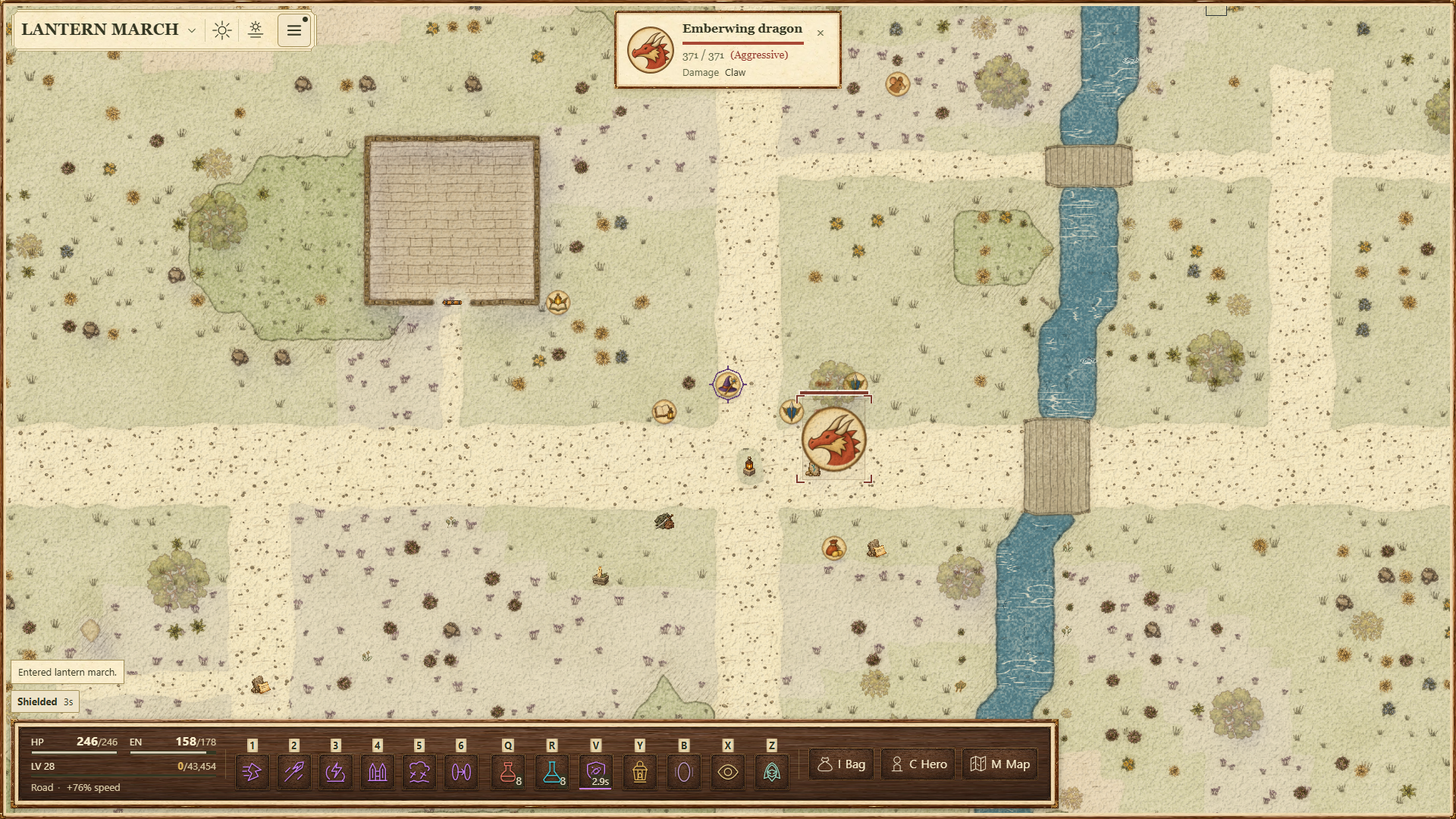
Out of the fire
An Emberwing dragon marks the ground before breathing fire. Find a route out of the cone or raise your class defense.
Damage & protection
Every attack deals a type of damage. Your weapon sets the type of your basic attacks. Most abilities have a type of their own; a few weapon strikes, such as Cleave and Ambush, deal your weapon’s.
Protection
When a hit lands, protection reduces it by a random amount, up to the matching rating plus the armor on the body part struck. Physical protection covers physical damage and elemental protection the rest, while All protection counts against both. Armor can absorb a whole hit.
| Reduced by | Damage types |
|---|---|
| Physical protection | bite, bludgeoning, chop, claw, lash, piercing and slashing |
| Elemental protection | acid, cold, fire, force, lightning, necrotic, poison, psychic, radiant and thunder |
| No protection | life drain |
Life drain passes through armor and every chance to avoid it; only absorbing shields stop it.
Avoiding a blow
After armor, the first of four chances that succeeds avoids the blow, in this order: fortitude, parry, block and dodge. Parry needs a weapon and block a shield. Fortitude avoids all the damage. The others avoid either all of what remains or half of it: all is likelier the higher your level is against the attacker’s. Absorbing shields take what is left.
- A blow you avoid completely can’t poison, stun or slow you. Armor and shields alone don’t prevent those effects.
- Burning ground and poison ticks can’t be avoided.
- A critical hit deals double damage, before protection. Critical chance comes from equipment, passive abilities and blessings; Luck instead gives a 1% chance per point to roll the highest result.
Reading a fight
Numbers rise from the struck token. Red is harm to you; dark ink is damage to an enemy, amber and larger when critical. Green is healing. A blue word names what saved you, such as parry or dodge.
An exclamation mark beside your hero warns when your health falls below a quarter.
Combat traces
Fights leave marks on the ground, such as blood, ichor, bone dust, scorch and frost. They fade after a few minutes. To hide them, turn off Combat traces in Settings → Display; the choice is kept on that device.
Marks on a token
A mark at the corner of a token shows the strongest hold on that hero or creature, and +N counts any others.
| Mark | Meaning |
|---|---|
| Starburst | Stunned |
| Z | Asleep |
| Knot | Rooted or trapped |
| Hourglass | Slowed |
| Hooked arrow | Taunted |
| Flame, cloud or cross | In lava or caught by a fireball, in poison gas, or in healing mist |
Fighting together
Rewards are not split. Every hero who helped defeat a creature receives its full experience and gold, and rolls for an item of their own. See who counts as helping.
Defend a teammate
In a party, turn on Defend on a teammate’s card to take the enemy blows meant for them while you stand within 2 tiles and in sight. Area attacks still reach them, and each teammate can have one defender.
Blows you take this way pass your own armor and wards, and they can defeat you. Defend costs no energy and leaves your abilities and class defense free. It ends if you fall, travel or leave the party.

A sword for hire
Hire a mercenary from the guild in Lantern’s Rest. It fights beside you, takes a place in your party and a share of what you earn.
Mercenaries
Complete The Guild’s Proving at the Mercenaries’ Guild in Lantern’s Rest to hire a mercenary. Support mercenaries heal, rangers fight from a distance, and defenders fight beside you. A mercenary joins only fights already started with you, your party or itself, and the foe you select.
While a mercenary travels with you it takes 10% of the experience from defeated foes and 25% of the gold you earn adventuring.
Guard
Press O to have a defender guard you. For 8 seconds it takes the enemy blows meant for you while it stands within 2 tiles and in sight, though area attacks still reach you. You can call again 30 seconds after each call. Read more about mercenaries.
Defeat & recovery
Recovering in the field
- Every heartbeat. Health and energy recover on their own, at half speed while you are attacking.
- Potions. Press Q for a health potion or R for an energy potion; on a touch screen, use the red and blue potion buttons. They use the smallest potion that fills what you are missing, or your strongest when none does.
- Checkpoints. Rest at a checkpoint lantern once you have been out of combat for 5 seconds. It restores health and energy, clears effects and wounds, and makes that lantern your return point.
Wounds
Every hit strikes one body part, and heavy hits bruise, wound and finally cripple it. An injured part weakens what it does: arms and hands your weapon damage and parry, legs and feet your dodge, the head your critical chance, and the chest, neck and waist your health recovery. A crippled part also slows you. Healing, potions and recovery mend the worst wound first. Open Hero (C) to see your wounds under Body & wounds.
If you fall
After 5 seconds you return to your checkpoint with full health and energy and no wounds. You keep your levels, abilities, equipment, inventory and gold, and defeat itself wears nothing out. For 3 seconds after you return, nothing can harm you.
What a fall ends
Your summoned companions vanish, meals and other preparation boons wear off, and Defend on a teammate stops. A hired mercenary steps away and returns beside you.