ABOUT THE GAME
How to play
Follow the lights. Find the missing.
No Map Home is a free cooperative fantasy RPG you can play in a web browser. Start as a guest to explore, then create an account during play to keep your hero. The game guide covers each topic in more depth.
Your first journey
- Choose a class. Open Character & starting stats on the play page. Preview the ability tree before choosing your class and race. Your race choice is permanent. Compare the classes.
- Meet the people of Lantern’s Rest. Read Mara’s account of the missing adventurers. Move close to residents, stairs, checkpoints, and discoveries: Nearby lists what is within reach, with an action for each. Mara also upgrades your lantern, and the Mercenaries’ Guild hires out fighters to heroes who prove themselves.
- Prepare before leaving. Check your equipment and abilities, then follow the wilderness roads or descend into the vaults. Revealed terrain stays on your map. See where the roads lead.
- Keep a way home. Rest at checkpoint lanterns and awaken city waystones as you find them. Your base portal opens a way back to your home; return through it to resume the journey.
Movement and combat
Use WASD or the arrow keys. Hold two directions to walk diagonally. Release to stop.
Scroll the mouse wheel up to zoom in, or down to zoom out.
Drag anywhere on the map to walk in eight directions. Release to stop.
Spread two fingers to zoom in. Pinch them together to zoom out.
Find your way on a phone
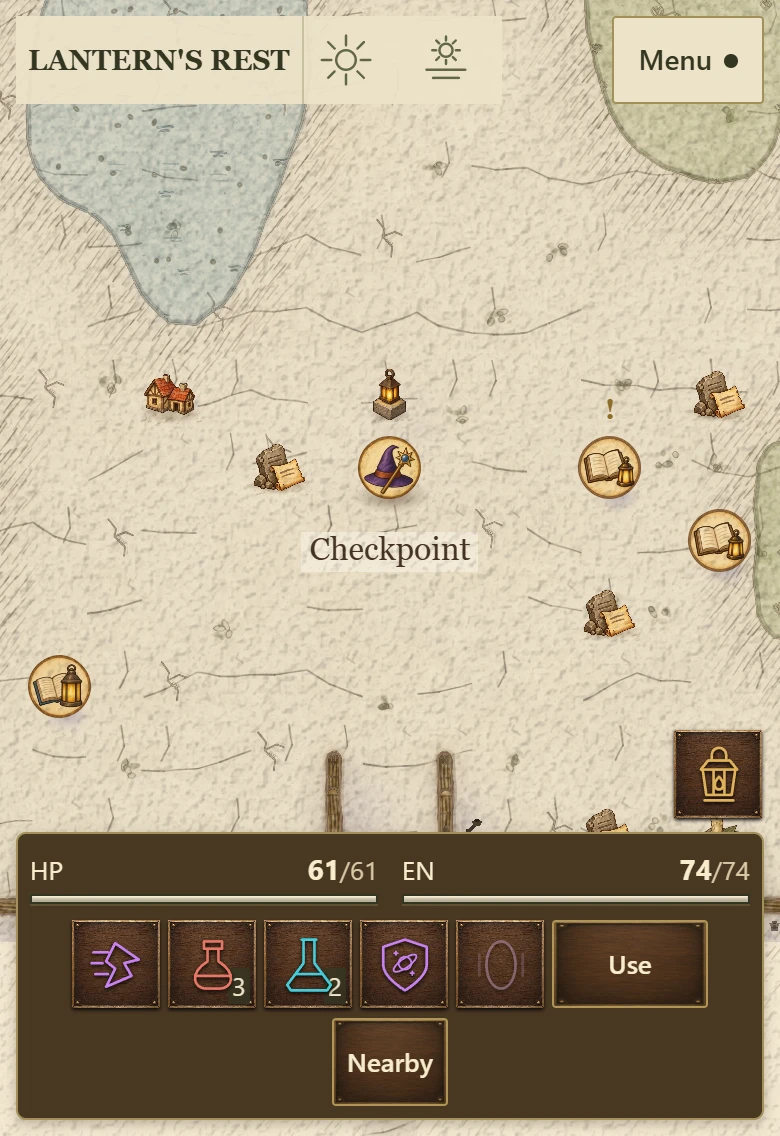
- Menu · top right
- Open Bag, Hero, Abilities, maps, journals, and Settings. Back to game closes panels.
- Actions · bottom
- Tap an ability to use it. The red potion restores health; the blue restores energy. Your class defense and portal home are beside the potions.
- Lantern · above the actions
- Kindle your light for a short blessing. Where it is dark, a hood beside it covers the light.
- Use and Nearby
- Move close, then tap the action at the end of the row. It names what it will do, such as Use, Talk or Travel. Nearby lists other choices.
The world continues while panels are open. Movement is real-time; the game does not wait for each player to take a turn.
Choose your next move
- Select a target. Tap an enemy; tap it again to stop. Basic attacks repeat while it is visible and in weapon range, on a shared 2-second heartbeat. A reachable selected enemy takes priority. If your target is empty or peaceful, incoming attacks select the attacker, even after you clear your target.
- Aim an ability. If it needs a location, tap a tile or slide to aim and release to cast. Cancel stops aiming, preparation or a readied ability.
- Ready the next one. Choose an ability while another is preparing, or just before its cooldown ends, and your hero begins it as soon as it can. Only one ability waits at a time; choosing another replaces it.
- Avoid marked attacks. Watch the ground before a large creature attacks. Move out of danger or use your defense button beside the potions.
Read how combat works in detail.
Keyboard and mouse controls
- WASD / Arrows
- Move
- Click / T
- Select an enemy
- F
- Select an ally
- V
- Use class defense
- Y
- Kindle your lantern
- U
- Cover or uncover your lantern
- O
- Ask your defender mercenary to guard you
- B
- Open a portal to your home
- Escape
- Cancel aiming, preparation or a readied ability, release a target, or close the top window
- 1–6
- Use an equipped ability
- Q / R
- Drink a health / energy potion
- E / right-click
- Interact with something nearby
- X
- Search for hidden things
- Z
- Sneak where guards keep watch
- I / C / K
- Open Bag / Hero / Abilities
- M / G
- Open the local map / world atlas
- H / J / L
- Open Quests / Lore Book / Action Log
- P / Enter
- Open Party & Friends / Chat
- ?
- Open Settings and controls
Day, night and your lantern
One day passes over the whole world every 60 minutes, the same for every hero. Open-air places darken through dusk, stay dark through a 12-minute night and brighten at dawn. Rooms stay lit, and dungeons, mines and cellars stay dim at every hour.
- Kindle (Y)
- For 45 seconds your light reaches farther, and you gain Vitality and the attribute your class attacks with. You can kindle it again 3 minutes after you light it.
- Cover (U)
- Dim your light to a glow at your feet. In the dark, away from torches, fires and other heroes’ lanterns, enemies notice you only at closer range. Sneaking covers it; kindling it or striking a foe uncovers it. Covering it ends a kindled blaze.
On a phone, tap the lantern above the right end of your actions. Wherever it is dark, the hood beside it covers your light.
Some wilderness visitors come only at night, and they spot an open lantern from farther away. Mara upgrades your lantern in Lantern’s Rest, up to level 15. Read about the world by day and night.
Recovery and progress
- At a checkpoint
- Restore health and energy once you have been out of combat for 5 seconds.
- After defeat
- Return to your checkpoint after 5 seconds. You keep your levels, abilities, equipment, and inventory.
A home between journeys
Lodgings beside the Lantern’s Rest checkpoint lead to your personal home. Every hero on your account shares its rooms, trophy gallery and vault. A guest can keep gold in the vault from level 2; storing items needs an account. More rooms open as you adventure.
- Base portal. Press B or use the portal button to open a portal home, or to your party’s Company Hall while grouped. Wait 5 seconds after combat, then stand still for 2 seconds.
- Private wilderness. The gateway in your lounge leads to land of your own. Plant crops, gather materials, cook, and build; crops keep growing while you are away.
Read about homes and crafting.
Play alone or with friends
Towns and wilderness are shared. Dungeons, ruins, and mines are private expeditions for one hero or a party of up to eight.
- Invite. Open Party & Friends to invite an online hero by name, or choose Invite friends to copy a join link. Only the party leader can share a link.
- Join by link. A friend opens the link, plays as a guest or signs in, and joins on entering the world. Links last up to 24 hours, while the party has room and the link stays enabled.
- Party sites. Every wilderness region has two sites, such as a sealed crypt or a cursed coffer, that open only for two or more heroes of one party. Captain Ilsa Marrow in Lantern’s Rest rewards you for bringing a friend.
- Meet up. Joining a party does not move your hero. Use a teammate’s Teleport action when both heroes are alive, online and out of combat for 5 seconds, then stand still for its 2-second preparation.
Hire a mercenary. Complete The Guild’s Proving for Captain Maelis Corran in Lantern’s Rest, then hire a support, ranger or defender mercenary. It travels at your level, up to level 40, and fills one of your party’s eight places. Read about parties and mercenaries.
- As a guest: join parties and read global Chat and Trade. From level 2, this browser keeps your guest for 180 days after your last visit.
- With an account: save your hero, keep friends, and use Nearby and Party chat. Global chat writing unlocks at level 5.
Before you begin
The game runs in your browser with JavaScript enabled and supports touch, keyboard, and mouse. You can read these guides and browse the media pages without JavaScript.
Compare the classes or look at real gameplay screenshots before entering the world.